Showing posts with label app. Show all posts

Monday, April 21, 2014

Google finally combines text and chat conversations in Hangouts

Google is crossing off a major complaint about Hangouts this week: the messaging app will finally merge your SMS and Hangouts conversations.  Users can pick between Hangouts and SMS when sending a given message, but that's it. There's no option to use Hangouts with SMS as a fallback option, which is the approach Apple takes with iMessage.

Google also promises that "different message types will be easy to tell apart in the conversation," but it's not as obvious as the company lets on. Your received messages all look the same, with only a small "via SMS" label below texted replies. Sent messages easier to tell apart with a glance; they're green when you're sending regular Hangouts messages, and white when sent as an SMS message. Users that don't like the merged view can revert back to the old style to keep things separate.

The Verge
Read more: Google finally combines text and chat conversations in Hangouts

Tuesday, April 15, 2014

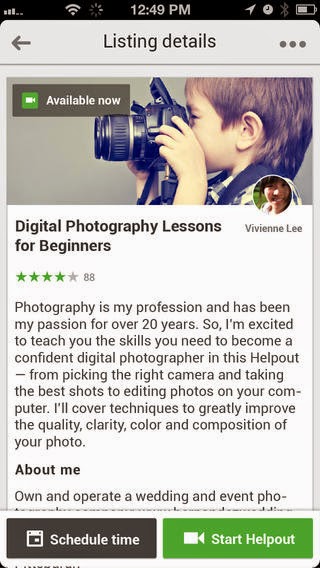
Google Helpouts arrives on iOS, but only for free sessions


Google today released an iOS app for Helpouts (via 9to5Mac), its Hangout-based remote learning platform, but you’ll only be able to browse free sessions. Helpouts launched last November as a service for experts in a subject matter to earn money by chatting with users interested in learning about the topic. Categories include Art & Music, Computers & Electronics, Cooking, Education & Careers, Fashion & Beauty, Fitness & Nutrition, Health and Home & Garden.

The Next Web
Read more: Google Helpouts arrives on iOS, but only for free sessions

Wednesday, April 2, 2014

Book Creator: Create Ebooks From Your Android Tablet

After almost three since launching for iPad, Red Jumper Studio has brought its personal ebook-creating app to Android tablets. The aptly-titled Book Creator app probably isn’t what you’d use to self-publish your first piece of fiction, but it will work well for personal use, say, creating stories for your kids, building family photo albums or, indeed, prototyping something that you’re going to create in a more sophisticated piece of software.

➤ Book Creator | Google Play
The next web
Read more: Book Creator: Create Ebooks From Your Android Tablet

Now you can drag and drop to rearrange your Google apps


New! Now you can drag and drop to rearrange your Google apps . whach this video

Tuesday, April 1, 2014

Burn Calories with UC Calorie Browser!

Check out the revolutionary Calorie Browser at http://www.ucweb.com
. Calorie Browser is a highly intelligent gesture-controlled mobile browser designed to get your body moving while surfing the internet! By using your body gestures to perform browsing functions, Calorie Browser gives you a healthy, all-in-one web experience! http://bit.ly/caloriebrowser

Main Features:
Refresh Page - spin 360 degrees like a ballet dancer!
Zoom in - stretch your arms out to your sides as if you are swimming the breaststroke.
Incognito Mode - Roll on the floor to activate.
Download - Run to start downloading. The faster you run, the faster the download speed. Run like Usain Bolt to download a movie in 10 seconds.
Bookmark Page - Hurl an imaginary javelin through the air.
Speed Dial - Shake your body to go to Speed Dial.
New Tab - Jump as high as you can to open a new tab.
Page Scroll - To scroll down the page, take forward steps while jabbing your arm. To scroll back up, do the same motion backwards.

Watch video

Burn Calories with UC Calorie Browser!

Monday, March 31, 2014

Best Android games of March 2014


Best Android games of March 2014
APPLICATIONS
By Simon Sage | Mar 31 2014 | 5:47 pm  | 0 COMMENTS
Need Android games? We got 'em! Here are our favorite game releases for March 2014

In our ongoing quest to bring y’all the best games the Google Play Store has to offer, we’re going to start rounding up our favorite Android game releases every month. Often this will include big releases that you might have missed throughout Android Central news stories or our picks of the week, but we’ll try to dig up some hidden gems for you too. We’re also going to be rounding up the month’s non-game apps in a separate post, so keep your eyes peeled.

March was a pretty solid month for Android gaming! It was particularly nice to see so many of these launch so closely in line with their iOS counterparts. Below you’ll find some action, some strategy, some RPG, and even a rare high-quality trivia game.

Androidcentral
Read more: Best Android games of March 2014

Outlook Web App for Android


Outlook Web App for Android will help your smartphone fit in at work
3/31/2014 5:19PM by Jon Fingas
It's easy to find Android phones that can handle the Exchange-based email you often find in the workplace, but they don't always support all the latest features. That won't be a problem for much longer, though, as Microsoft has just revealed plans to bring Outlook Web App to Google's platform later this year. Much like its iOS counterpart from 2013, the Android release should let you take advantage of Office 365 technology that might not make it into third-party email software. The app may not be all that exciting by itself, but it could be the key to using your preferred phone for work instead of having to switch to company-approved hardware.

Engadget
Read more: outlook web app for android

Sunday, March 30, 2014

Online learning company Coursera launches an Android app


Online learning company Coursera has finally come to Android after launching an app for the Google-owned mobile platform. The launch comes just over three months after Coursera debuted its iOS app, its first native mobile app, and will help the company towards its goal of providing access to free education worldwide.

➤ Coursera for Android | iOS

The Next Web
Read more: Online learning company Coursera launches an Android app

Microsoft Pulls Fake Google Apps from Windows Phone Store


Microsoft today pulled six fake Google apps from the Windows Phone Store, after we contacted the company about the issue. The apps in question were: “Hangouts,” “Google Voice,” “Google Search,” “Google+,” “Google Maps,” and “Gmail – email from Google.”  All of these are published by a “Google, Inc” (instead of “Google Inc.”) and priced at $1.99 each. The only app that Google offers for Windows Phone is its search app, and the publisher is “Google Inc.”

The Next Web
Read more: Microsoft pulls fake Google apps from the Windows Phone Store, but doesn’t fix larger approval process problem